Skip to content

Alex Danvy

9 posts by Alex Danvy

Changelog 2026-08-17

E-invoicing lands in the API, and Altoviz is now reachable from your terminal, your automation platform, and your AI assistant.

The 2026 French e-invoicing reform is now visible through the API.

Invoices carry their platform status:

  • eInvoicingStatus — where the document stands on the network, from ApiUploaded to FrAccepted, FrDisputed or FrPaymentReceived (55+ status codes covering the API, PDP, PPF and Altoviz-side lifecycles)
  • eInvoicingInvoiceId — the identifier assigned by the platform
  • eInvoicingProviderId — the PDP that handles the document

Settings expose a new eInvoicing section so you can drive the whole flow:

  • profileStandard or Advanced
  • autoSubmitInvoicesOnFinalize and validateBeforeSubmit
  • autoAcknowledgeReceivedInvoices and autoProcessTerminalStatuses
  • autoEmitPaymentSent, autoEmitPaymentReceived and autoCreateReceiptFromIncomingPayment
  • autoSendEReporting
  • includeTextLinesInXml

And two companions: sales.customersLiableToEInvoicing, plus an e-invoicing readiness report already available since June.

Finalizing is irreversible, and a rejected e-invoice is a bad way to find out something was missing. Two new endpoints let you ask first:

  • POST /v1/SaleInvoices/CheckEInvoicing/{id}
  • POST /v1/SaleCredits/CheckEInvoicing/{id}

They render the Factur-X / CII e-invoice, submit it to the platform’s validator, and return the findings. Nothing is finalized, nothing is transmitted.

The result gives you three ways to read the outcome:

  • isValid — the verdict, and the one to trust: a document can be non-conformant while every finding is only a warning, because the French BR-FR rules are reported as warnings
  • findings — structured entries with a severity (Error, Warning), a source telling you where to fix it (Application, Directory, Platform), a French text, and, when the platform reported one, the location in the generated XML and the validator name
  • messages — the same findings flattened to one-line strings, for a quick display

Draft documents only: a finalized one returns 409.

Documents now tell the full story of their own lifecycle.

On invoices:

  • cancelledCreditId / cancelledCreditNumber — the credit this invoice was issued to offset

On credits:

  • isCancelled and cancellationInvoiceId / cancellationInvoiceNumber — the invoice that cancelled this credit
  • replacedBy — the corrected credit that supersedes this one

GET /v1/SaleInvoices and GET /v1/SaleCredits gained two tri-state filters built on the new InclusionFilter type — Excluded (the default when the parameter is omitted), Only, or All:

  • Cancelled — hide, isolate, or include cancelled documents
  • Processed — same, for documents whose terminal e-invoicing status has been taken into account

⚠️ Breaking change: the boolean IncludeCancelled parameter on GET /v1/SaleInvoices is gone. Replace IncludeCancelled=true with Cancelled=All.

Paying an invoice or refunding a credit can finalize it on the fly. You now decide which date it gets:

  • finalizationDate — the date the document is finalized on, defaulting to the document’s own date, and distinct from the payment or refund date
  • dateAdjustmentNone, MinimumDate, or Today, to let the API pick a valid date for you

Both are available on the request bodies of POST /v1/SaleInvoices/MarkAsPaid and POST /v1/SaleCredits/MarkAsRefunded, and as query parameters on POST /v1/SaleInvoices/Finalize/{id} and POST /v1/SaleCredits/Finalize/{id}.

Two new read-only endpoints for home-care businesses:

  • GET /v1/HomecareServices/activities — the SAP activities, each with the TSA group it belongs to
  • GET /v1/HomecareServices/tsa-groups — the TSA groups (regroupements)
  • vat.vatRegimeFranchise, Simplified or Normal
  • company.summaryHtml — the rich company description
  • general.autoCollapseMenu
  • Email styling got finer grained: textColor, outerColor, buttonColor and buttonTextColor replace the single foreColor
  • Suppliers now have an active flag, like customers

⚠️ Breaking change: Annually was removed from VatDeclarationPeriodicity. Only Monthly and Quarterly remain.

altoviz is a self-contained CLI wrapping the REST API — customers, suppliers, invoices, quotes, products, receipts, and more, without leaving the shell.

  • No runtime required: a single binary for macOS, Linux and Windows
  • 9 output formats: table, JSON (pretty, compact or colored), YAML, Markdown, CSV (European or American) and TSV
  • Shell completions for bash, zsh, fish and PowerShell
  • Auth via environment variable, config file or --api-key
  • Scriptable: pipe JSON in with --file -, pick columns with --columns, page through with --all-pages

One command line can often solve daily life problems

Terminal window
# Fetch a single customer as JSON
altoviz customer get 42 --output json
# Export this year's invoices to CSV
altoviz export invoices --from 2026-01-01 --to 2026-12-31 --format EuropeanCsv --out invoices.csv

Install it with Homebrew, Chocolatey, WinGet, the Debian and Fedora packages, or the one-liner installer.

The Altoviz MCP Server connects ChatGPT, Claude, VS Code, Cursor or any other Model Context Protocol client straight to your account. It is remote — nothing to install.

  • Server URL: https://mcp.altoviz.com
  • Transport: Streamable HTTP and SSE
  • Authentication: OAuth 2.0, signing in with your Altoviz API key

It covers invoicing, contacts, catalogue, expenses, statistics, exports and webhooks, and it is listed in the official MCP Registry.

Automation guides are here for the three major platforms — Zapier, Make and n8n. Altoviz is the first French invoicing app for small businesses to integrate with all three.

Changelog 2026-06-02

Tons of new APIs were added and Altoviz Developer Hub is now running on steroid.

Statistic APIs expose the numbers used in the app dashboards like :

  • Monthly sales and expense breakdown for a given year​
  • Sales turnover comparison: current year, previous year, current month, previous month, and same month last year​
  • Expense turnover comparison: current year, previous year, current month, previous month, and same month last year
  • Micro-business sales turnover comparison (paid invoices only): current year, previous year, current month, previous month, and same month last year
  • Micro-business expense turnover comparison (paid expenses only): current year, previous year, current month, previous month, and same month last year
  • All-time total turnover
  • Turnover evolution over one or more years, broken down by month
  • E-invoicing readiness: suppliers and customers configured, and those with issues

Export APIs will allow you to export the most useful data from the app in the format you need.

Available data are :

  • Bank transactions
  • Customers
  • Expenses
  • Expenses reports
  • Invoices
  • Products
  • Purchases
  • Quotes
  • Receipts
  • Settlements
  • Suppliers

Formats are :

  • JSON
  • Microsoft Excel
  • American CSV
  • European CSV
  • TSV
  • Markdown

Each export was carefully built to facilitate further data analysis. They have temporal columns and relational data out-of-the-box.

We’re now using a whole new website management tool that will ease how we publish content and how fast it is : We moved from Docusaurus to Starlight.

Starlight is made with Astro :

  • it has a better architecture and principles
  • it is easier to customize for our needs
  • its community is more vibrant

Changelog 2025-08-04

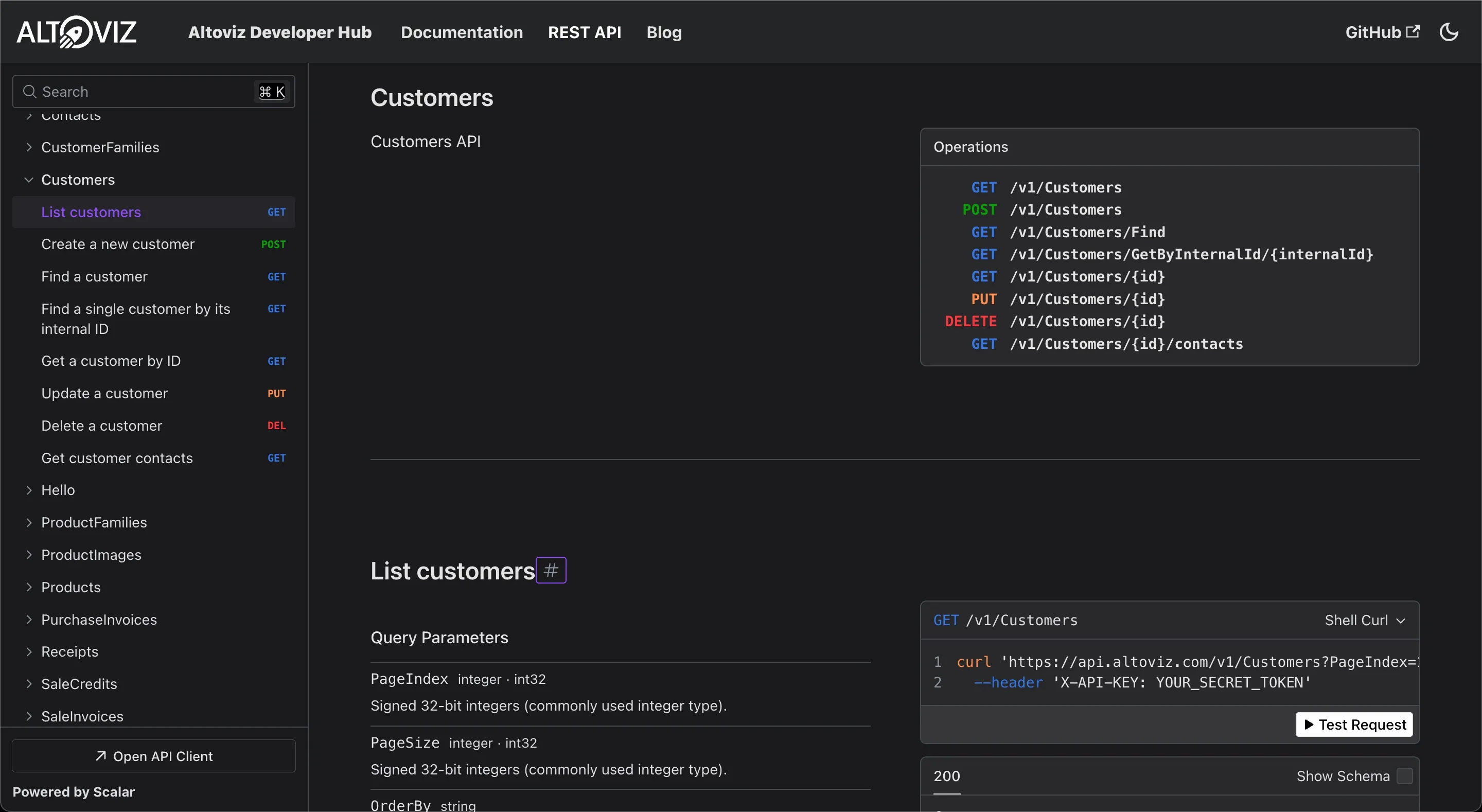
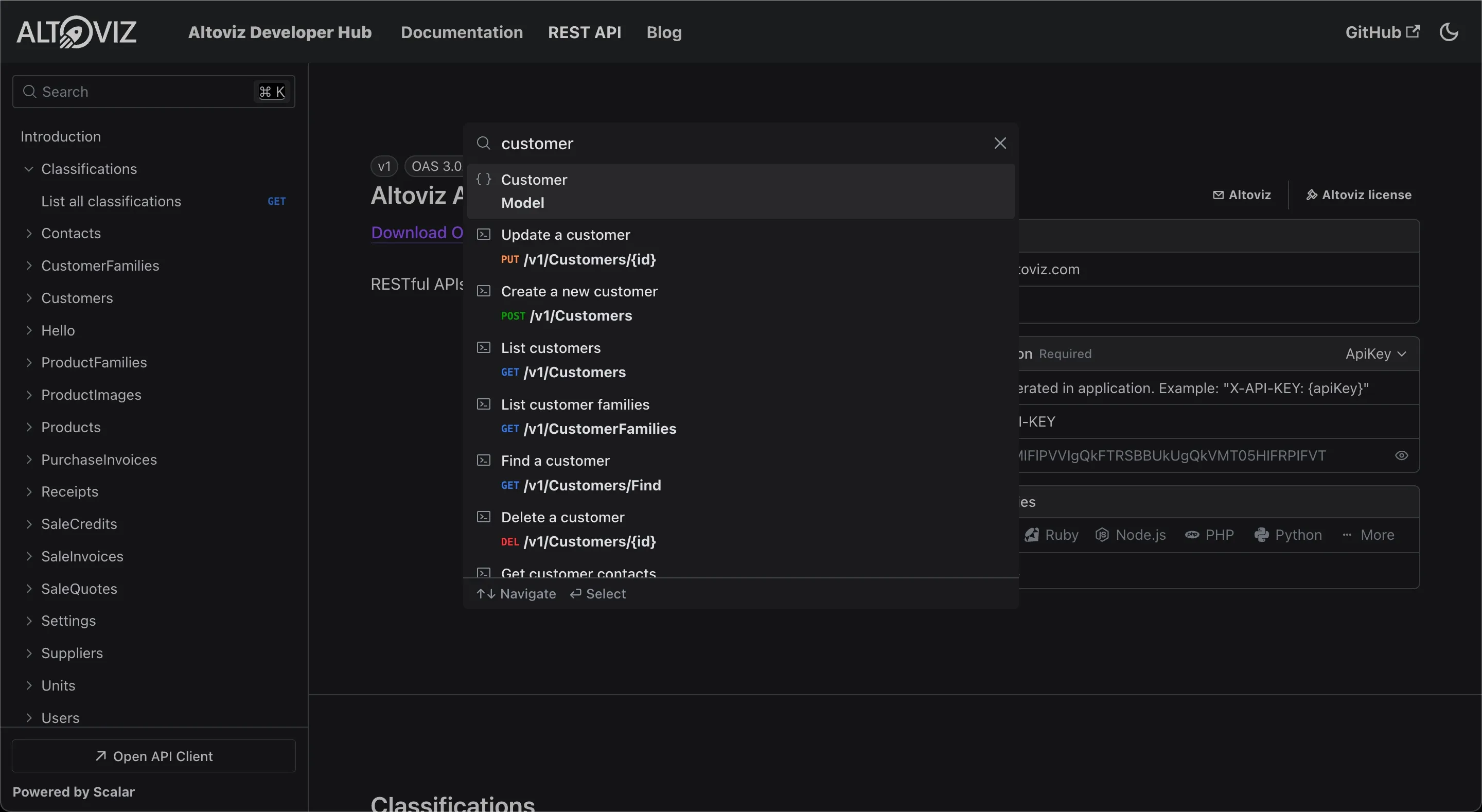
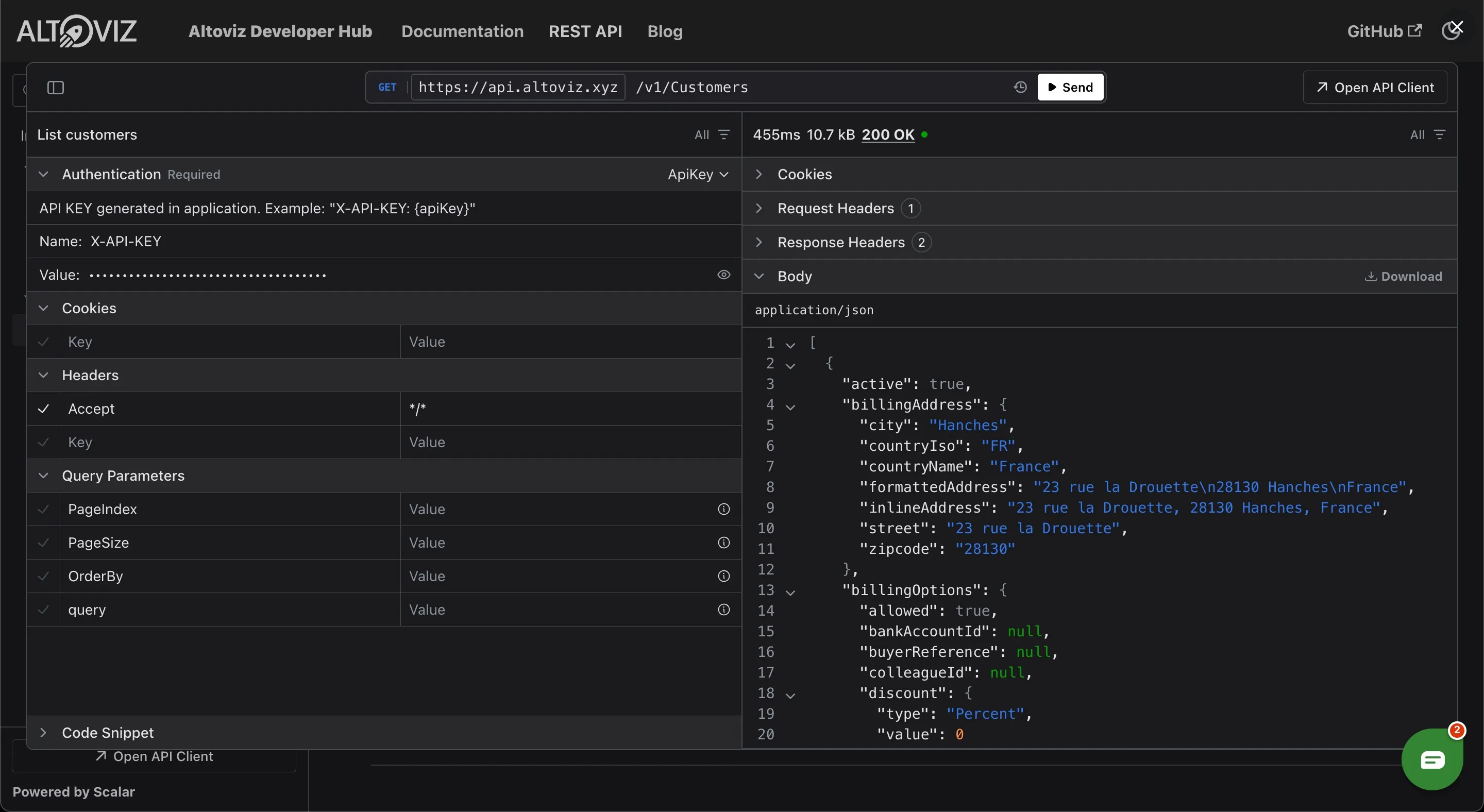
We introduce a whole new API reference page, easier than ever to discover and experiment the Altoviz API.

New API reference page

The new API reference page brings some important new features :

  • an easier way discovery all the possibilities offered by the API, thanks to a whole new layout
  • support for light and dark theme
  • a dedicated search engine API search engine
  • more supported languages for the examples
  • a ability the live test the API from your browser Execute API from your browser

Changelog 2025-01-22

Some great new possibilities for API amateurs : Suppliers, receipts and metadata.

You can list, add, edit and delete receipts /v1/Receipts

You can list, add, edit and delete suppliers /v1/Suppliers

Metadata allow you to store important informations for your app on Altoviz entities. We added the possibility to pass metadata to the mark-as-paid API. Those metadata will be stored on the payment.

Changelog 2024-08-28

Following your feedback, we added a lot of new APIs and extended existing APIs. This post will make a little recap of the new stuff added in the last months.

You might need to create an integration of the Altoviz services with your product and in case you have common entities, you will have to keep the data in sync. That’s why we added an “internal id” on entites such as contacts, customers, products, quotes and invoices.

As an example, if you have contacts within your app and those contacts have their own unique id, you can set this unique id to the internal id of the Altoviz customer. You wil then be able to get this customer back using your unique id and not the Altoviz one. You no longer have to save Altoviz ids.

You can create purchase invoices just by sending a PDF file to the app through the /v1/purchaseinvoices/file API.

Purchase invoices can be downloaded too using the /v1/PurchaseInvoices/Download API.

Invoices can be updated and deleted as long as they are still in draft mode.

Invoices can be marked as paid. Set the date and payment method method and you’re done. Just one call to this API to finalize and pay an invoice ! /v1/SaleInvoices/Finalize

You can find invoices using your own id (internal Id).

Notes becomes Footer notes and Header notes was added.

You can sort the result, filter by dates, customer or status and even include canceled invoices. v1/SaleInvoices

Delete a quote

Find quote by internal Id

Just like sales invoices, you can list, add, edit and remove sales credits.

List all available units. If you need to add, edit or remove units, dot it in the app.

You can get a customer by its internal id (the id coming from your app) using the v1/Customers/GetByInternalId API

You can get a customer family by its internal id (the id coming from your app) using the /v1/CustomerFamilies API

You can add, update and get product images using the Product images APIs API

We added a very simple API to quickly check your API key. Just call /hello with your API key.

API reference documentation lists fields ordered

Section titled “API reference documentation lists fields ordered”

To make the reference documentation even easier to read, fields are now sorted alphabeticaly.

Changelog 2023-10-19

An additional authentication method is introduced using HTTP basic authenticationa. Read more

You can get the units list using the Units API

A new type parameter allow to filter the returned classifications.

Read more

Changelog 2023-10-05

An additional authentication method is introduced using a URL parameter. Read more

Some API like contact creation or customer update had a useless Id member.

We added more webhooks to give you more control over what happens in the app. Read more

A new settings API allows you to get all settings including timezone, logo, vat number, var mode and more.

Terminal window
curl -iH "x-api-key:5b26c099-5d5e-4087-90a0-722f9d5b92ee" https://api.altoviz.com/v1/settings

Read more

Changelog 2023-09-21

You might need to create an invoice from scratch, without using any existing product, so you will have to spefify the appropriate VAT for each line. Those things are not frequently changing but a better approach than hard coding is to list the VATs.

Terminal window
curl -iH "x-api-key:5b26c099-5d5e-4087-90a0-722f9d5b92ee" https://api.altoviz.com/v1/vats

The result is a list of all existing VAT

[
{ "id": 22, "rate": 0.0, "region": "FR", "label": "0.0% - FR" },
{ "id": 23, "rate": 0.0, "region": "EU", "label": "0.0% - EU" },
{ "id": 24, "rate": 0.0, "region": "IE", "label": "0.0% - IE" },
{ "id": 25, "rate": 20.0, "region": "FR", "label": "20.0% - FR" },
{ "id": 26, "rate": 10.0, "region": "FR", "label": "10.0% - FR" },
{ "id": 27, "rate": 5.5, "region": "FR", "label": "5.500% - FR" },
{ "id": 28, "rate": 2.1, "region": "FR", "label": "2.100% - FR" }
]

REST API reference

Classifications are our way to produce accounting registers from user created invoices. You can now get a complete list of existing classifications.

Terminal window
curl -iH "x-api-key:5b26c099-5d5e-4087-90a0-722f9d5b92ee" https://api.altoviz.com/v1/classifications

The result is a list of classification with all the detail. Did you notice the associated VAT ?

[
{
"id": 162,
"label": "Abonnements/Locations",
"description": "Abonnement ou location de matériel (hors locations mobilières/immobilières), hébergement de site internet...",
"accountNumber": "6131",
"defaultVat": {
"id": 25,
"rate": 20.0,
"region": "FR",
"label": "20.0% - FR"
},
"isProduct": false,
"isService": false,
"type": "Expense",
"microBusinessDeclarationType": null
},
{
"id": 154,
"label": "Accessoires et petits matériels",
"description": "Biens et équipements dont la valeur est inférieure à 500€ HT : bureau, tablette, téléphone, etc.",
"accountNumber": "6051",
"defaultVat": null,
"isProduct": false,
"isService": false,
"type": "Expense",
"microBusinessDeclarationType": null
}
]

REST API reference

Hello World !

This is a very special day today for the Altoviz team. We are launching our initiative for developers including :

The Altoviz platform provides free RESTful APIs to deal with quotes, invoices, contacts, customers and products.
This is a great opportunity for every developers creating apps and solutions that at some point could generate invoices or sync contacts.

We created the Altoviz Developer Hub website to publish developer oriented content only. App users and customers will still use the mainstream blog on altoviz.com.
Everything useful we provide for developer will be there : A complete and up to date documentation for the APIs, tutorials and a blog. For samples and code, check out our GitHub page.
We’ll use the blog for every announcements. To ensure that you’ll not miss a thing, use the RSS feed or subscribe to the developer e-mail list in your account.

We share our code samples on GitHub 🐙 so every developers can explore, resuse and enhance them.
If you create a project on GitHub related to Altoviz, feel free to ping us. We will be more than happy to promote it.

The possibilities are endless, so are the opportunities. We can’t wait to see what awesome things developers will do with the Altoviz APIs.